Ingredient Callout
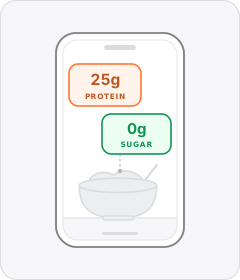
On-screen labels or lists highlight the active ingredients inside the formula or the unwanted ones left out.
How to spot it
Ingredient names, percentages or 'free-from' tags popping up beside skincare, supplement or food shots.
Verified on real video ads across 78 of 240 tracked brands (1,321 sightings across 79,497 ads).
Creative strategy
Why use Ingredient Callout
Graphic ingredient badges convert complex formulation names and dosage figures into quick visual proof right beside the product shot. High-contrast pill tags and checkmark icons let cautious buyers verify active compounds or excluded fillers immediately on mute. Anchoring each text label visually beside a bottle, cream swatch, or food bowl builds clear formula transparency.
When to use it
- Use ingredient pill badges beside close-up skincare and hair care shots to spotlight active compounds like retinol or peptides.
- Place macro, dosage, and allergen-free tags over mixing or overhead bowl shots in supplement and food and beverage ads.
- Add graphic checkmark lists to clean household, baby care, or pet food clips calling out unwanted additives left out.
When to skip it
- Skip ingredient badge templates for apparel, mobile apps, or electronics where specs belong in standard feature callout graphics.
- Avoid detailed multi-label overlays during chaotic wide shots with rapid motion where small formulation tags become unreadable.
Production guide
How to produce Ingredient Callout
- 1
Group key actives into three to five scannable pill badges, pairing each ingredient name with a short dosage or benefit.
- 2
Style tags with bold legible text inside solid or frosted pill boxes so scientific spellings stay clear over textured footage.
- 3
Animate each label beside the bottle, scoop, or bowl right on the beat the presenter mentions that specific ingredient.
- 4
Use simple checkmarks for included actives and clean cross icons for excluded fillers so scrollers parse claims instantly.
Common mistakes
- Stacking ten long chemical names onto one frame creates an unreadable wall of text on Meta and TikTok.
- Dropping ingredient tags into the bottom subtitle zone causes dosage badges to collide with auto-captions on YouTube Shorts.
- Listing unfamiliar scientific compound names with zero plain benefit tags leaves mobile shoppers unsure why the ingredient matters.
Field notes
Observed in real ads
- 1
On-screen text lists the first product's key ingredients as the creator names them aloud.
- 2
White pill-shaped text boxes slide onto the overhead bowl shot to label each distinct component of the meal.
- 3
On-screen text annotations appear next to each bottle to detail its specific active ingredients and hair care benefits.
Also called
Spec Callout Labels family
Sibling patterns
Close alternatives that solve a similar creative job.
Cross-layer recipes
Pairs well with
Combine Ingredient Callout with patterns from other layers to assemble a complete ad.
 +2 sub
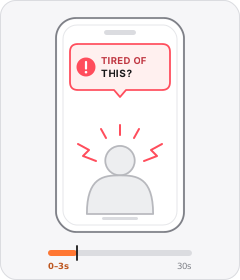
Problem Callout
The ad opens by naming or asking about a problem the viewer has.
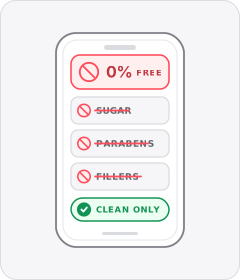
Free-From Callout
The ad pitches the product by listing the unwanted additives, allergens or harsh chemicals it leaves out.

Q&A Sticker
The ad frames itself as an answer to a follower's prompt inside an Instagram- or TikTok-style Story question box.
 +1 sub
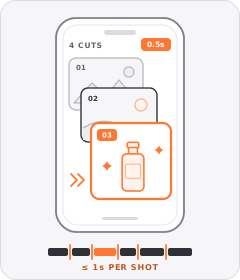
Quick-Cut Montage
The ad strings together a rapid sequence of distinct shots lasting roughly a second or less each.
Start free
Build a Ingredient Callout ad in minutes
Start with 7 days free in a ready-made demo workspace. No credit card required.