Stacked Split Screen
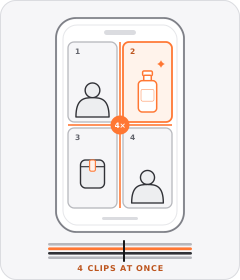
The vertical frame is split horizontally into top and bottom panels playing two clips at once.
How to spot it
One clip plays in the upper half of the phone screen while a second clip plays simultaneously in the lower half.
Verified on real video ads across 74 of 240 tracked brands (139 sightings across 79,497 ads).
Creative strategy
Why use Stacked Split Screen
Dividing a vertical phone screen into upper and lower halves makes direct visual comparisons easy to scan on mobile. Viewers can compare a before-and-after state, watch a human reaction alongside a product demo, or inspect two options together. Playing both clips at the same time delivers clear visual proof fast and keeps sound-off viewers watching.
When to use it
- Compare poor posture, stained carpets, or dull results on top against your home gadget or sleep product below.
- Pair a talking-head creator or pet reaction in one half with a close-up product demo or diagram in the other.
- Show two shades, textures, or skincare applicators together in wide macro shots that fill horizontal panels cleanly.
When to skip it
- Skip stacked frames for full-length apparel try-ons where horizontal cropping cuts off outfits at the waist or knees.
- Avoid two-panel splits when both clips feature fast action that competes for attention and confuses the viewer's eye.
Production guide
How to produce Stacked Split Screen
- 1
Frame wider horizontal shots for each half so key subjects sit cleanly inside short stacked rectangles on mobile.
- 2
Place the primary focal clip in the upper half where it stays clear of TikTok and Reels bottom captions.
- 3
Add a crisp dividing line and short label tags like Before and After so viewers decode the comparison within one second.
- 4
Anchor dynamic captions along the center seam so text remains readable while keeping both video panels unobstructed.
Common mistakes
- Burying the winning product reveal in the bottom panel lets platform CTA bars and descriptions cover the payoff.
- Cropping tight vertical footage into shallow horizontal halves chops off heads, hands, or product packaging.
- Running two unrelated clips with no clear label leaves viewers guessing how the top and bottom scenes connect.
Field notes
Observed in real ads
- 1
The screen divides into top and bottom halves to pair visual diagrams or preparation steps with dog reactions.
- 2
The vertical frame splits horizontally into two stacked macro shots showing different brush colors emerging from bottles simultaneously.
- 3
Horizontal two-up and three-up split frames compare a sleeper's neck angle on too-flat versus too-high pillows, and show three sleeping positions simultaneously.
Also called
More under Split Screen
Sibling patterns
Close alternatives that solve a similar creative job.
Cross-layer recipes
Pairs well with
Combine Stacked Split Screen with patterns from other layers to assemble a complete ad.
 +1 sub
Split-Screen Hook
The ad opens with the frame divided into two panels playing or showing different visuals at once.

Split Screen
The video frame is divided into two or more panels playing simultaneously.

Checklist Overlay
A stacked vertical list of short points marked with checkmarks, bullets or emoji icons appears over the footage.

Static Poster Ad
The entire video plays on a single unchanging graphic layout showing the product, offer, and call to action all at once.
Start free
Build a Stacked Split Screen ad in minutes
Start with 7 days free in a ready-made demo workspace. No credit card required.